

Deploying an application to Kubernetes from Clarive takes one pipeline rule and a server with kubectl on it. The rule copies the manifests to that server, applies them and waits for the new pods to come up. If they don't, it undoes the rollout. The environment the job is deploying to decides which cluster and namespace all of this happens in.
Everything below is written in Clarive HCL, the plain-text form Clarive 7.22 gives to rules, servers and projects. Three short blocks hold the whole setup. They can sit in Git next to the application and be imported into any Clarive installation.
A server that runs kubectl
The commands run on a deploy runner. That is an ordinary server registered in Clarive with kubectl installed, and in HCL it is a generic_server.
generic_server "kube-runner" {
  description = "Runs kubectl for the deploy rules"
  hostname    = "kube-runner.example.invalid"
}
Clarive reaches the runner the way it reaches any other server, over SSH or through a Clarive agent. The runner's kubeconfig file has one context for each cluster, holding the cluster's address and the credentials to use there. Clarive only ever names a context.
Keep the runner's kubectl within one minor version of each cluster's API server, which is as far apart as Kubernetes supports the two. A runner that serves several clusters needs a version inside that range for all of them, and it is worth checking whenever a cluster is upgraded.
That keeps the cluster tokens on the runner, out of Clarive. It matters because Clarive's job log keeps the full command line of every step it runs on a server, so a token typed into a command would be stored there too.
One set of values per environment
The context and namespace a job uses come from the project's variables. Clarive keeps a set of variables for each environment, plus a "*" set that applies to all of them. In the project's HCL they look like this, with the project's other attributes left out:
project "shop" {
  variables = {
    "*"  = {
      k8s_deployment = "web"
    }
    DEV  = {
      k8s_context   = "shared"
      k8s_namespace = "shop-dev"
    }
    TEST = {
      k8s_context   = "shared"
      k8s_namespace = "shop-test"
    }
    PROD = {
      k8s_context   = "production"
      k8s_namespace = "shop"
    }
  }
}
Here DEV and TEST share a cluster in two namespaces, and PROD has a cluster to itself. A team with a different layout changes these values. The rule stays the same.
One thing to know before editing this block by hand. An import saves the project's variables whole, the way the Variables tab in the interface does, so an environment left out of the file is removed from the project. The file has to list every environment the project deploys to.
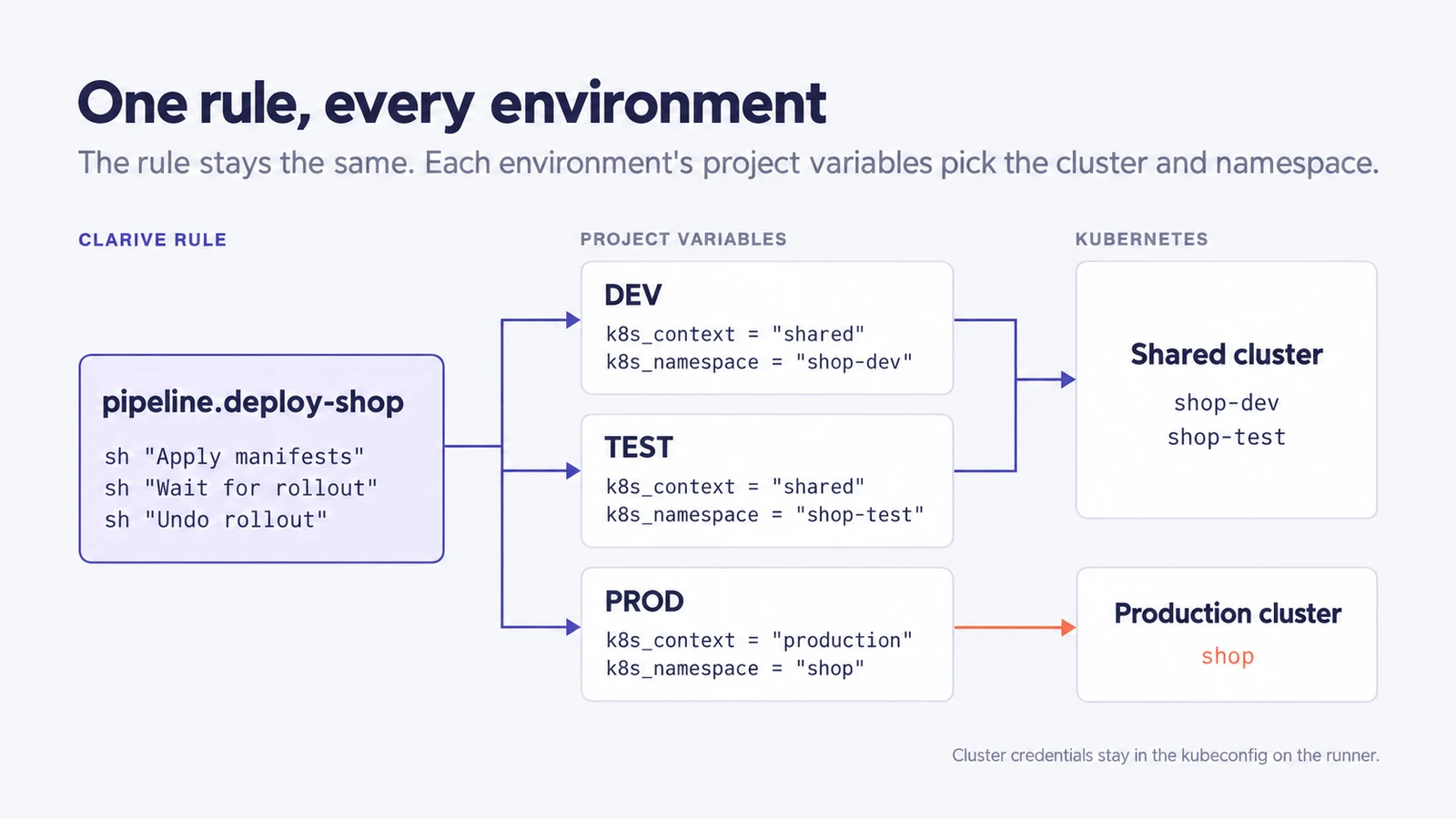
The rule
pipeline "deploy-shop" {
  desc = "Applies each project's Kubernetes manifests"
  when = "promote"

  step "INIT" {
    init "Init job home" {}
  }

  step "PRE" {
    load_items "Load job items" {}
    clone_repos "Clone job repositories" {}
  }

  step "RUN" {
    each_project "For each project in the job" {
      log "Show the target" {
        msg = "Project ${project}: namespace ${k8s_namespace} on ${k8s_context}"
      }

      ship "Copy manifests" {
        host             = generic_server.kube-runner
        local_mode       = "local_files"
        from             = "${job_dir}/${project}/k8s/*.yaml"
        exist_mode_local = "fail"
        to               = "/srv/deploy/${job_name}/${project}/"
        forward_only     = true
      }

      sh "Apply manifests" {
        host               = generic_server.kube-runner
        run                = <<-EOT
          kubectl --context ${k8s_context} --namespace ${k8s_namespace} \
            apply -f /srv/deploy/${job_name}/${project}/
        EOT
        needs_rollback     = "nb_after"
        needs_rollback_key = "k8s-applied"
        forward_only       = true
      }

      sh "Wait for rollout" {
        host         = generic_server.kube-runner
        run          = <<-EOT
          kubectl --context ${k8s_context} --namespace ${k8s_namespace} \
            rollout status deployment/${k8s_deployment} --timeout=5m
        EOT
        forward_only = true
        timeout      = 360
      }

      sh "Undo rollout" {
        host               = generic_server.kube-runner
        run                = <<-EOT
          kubectl --context ${k8s_context} --namespace ${k8s_namespace} \
            rollout undo deployment/${k8s_deployment}
        EOT
        needs_rollback     = "nb_after"
        needs_rollback_key = "k8s-applied"
        rollback_only      = true
      }
    }
  }
}
A Clarive job runs its pipeline rule once for each of its steps, and each step block holds the operations for one of them. INIT and PRE are the usual opening of a deployment rule. init creates the job's working directory, and load_items works out what the job contains. clone_repos then checks the project's repositories out into that directory, which is where the k8s/ folder of manifests comes from.
The deploy happens in RUN, the step that runs at the time the job was scheduled for. The each_project block loops over the projects in the job, and before each pass it loads that project's variables for the job's environment. That is how ${k8s_namespace} becomes shop-test in a TEST job. HCL never expands ${...} on its own. It keeps the text as written, and Clarive fills in the values when the step runs.
ship copies the manifests from the job's copy of the repository to the runner, into a directory named after the job so that files from an earlier release can't get mixed in. With exist_mode_local set to "fail", the job stops if there is nothing to copy. Left at its default, a mistyped path would ship no files and the job would carry on.
Each sh block runs a command on the server its host attribute names. The first applies the manifests and the second waits for the Deployment to finish rolling out.
The wait is what makes a green job mean something. kubectl apply returns as soon as the Kubernetes API server accepts the manifests, long before any new pod has started. Without the wait, a job could finish successfully while its pods crashed on start or never passed a readiness check. kubectl rollout status exits with an error if the rollout hasn't finished after five minutes, and that error fails the job.
The timeout of 360 seconds is for runners reached over SSH. Clarive cuts a command on an SSH connection off after 60 seconds unless the step sets a timeout of its own, so without it the wait would never get to five minutes.
Undoing a rollout that never finishes
When a job fails after one of its steps has marked it as needing a rollback, Clarive runs the rule a second time in rollback mode. Steps marked forward_only are skipped on that pass. Steps marked rollback_only run only then. The undo step is one of those. It runs kubectl rollout undo, and Kubernetes takes the Deployment back to the revision it had before.
Whether there is anything to undo is settled by a name. On the apply step, needs_rollback = "nb_after" records the name k8s-applied once the apply has succeeded, under its needs_rollback_key. The undo step names the same one, and a rollback-only step that names one runs only if it was recorded. So a job whose manifests never reached the cluster doesn't roll back a Deployment it never changed, and a job that fails waiting for the rollout does.
Getting the files into Clarive
The three blocks can go in one .hcl file or into the directory tree that cla export writes. Before anything is written, cla import-plan shows what an import would create or change. cla import lists the same changes and asks before applying them, with no as the default answer.
From then on, cla diff exits with 1 when the installation no longer matches the files. A scheduled job running it will notice when someone edits the rule by hand. The rule can also be pasted into the HCL view of the Rule Designer and saved from there.
The same rule on other platforms
For other container platforms the rule keeps its shape. What changes is the command in each sh step and sometimes what ship copies.
OpenShift's client, oc, accepts the same apply, rollout status and rollout undo commands as kubectl, with the same --context and --namespace flags. On a runner with oc installed, the rule works with oc in place of kubectl, and the namespace is the OpenShift project.
With Helm, ship copies the chart. The apply step runs helm upgrade --install with --wait, so Helm itself waits for the release's resources to become ready and the separate wait step can go. The undo step runs helm rollback with no revision number, which returns the release to its previous revision, ConfigMaps included. Helm takes the context and namespace through its --kube-context and --namespace flags.
For Amazon ECS (Elastic Container Service), the runner carries the AWS CLI and its own AWS credentials. The apply step registers a new task definition and runs aws ecs update-service to point the service at it. The wait step runs aws ecs wait services-stable, which can take up to 10 minutes before it gives up, so its timeout has to be longer than that. A service with the deployment circuit breaker turned on, and rollback enabled, goes back by itself to the last deployment that completed, and the undo step isn't needed.
HashiCorp Nomad reads its address and token from the runner, through the NOMAD_ADDR and NOMAD_TOKEN environment variables. The apply step runs nomad job run on a job file that ship copied over. With auto_revert = true in the job's update block, Nomad returns to the last stable version of the job when a deployment fails.
Plain Docker and Podman hosts have no cluster in between, so host names the container host itself. On a Docker host, the step runs docker compose pull and then docker compose up -d. On a Podman host it pulls the new image with podman pull and restarts the systemd service that runs the container.
What this leaves out
kubectl rollout undo restores the Deployment's pod template, meaning its image and container settings. It doesn't touch anything else kubectl apply changed, such as a ConfigMap or a Service. Teams whose releases often change those will do better with the Helm version of the rule.
The undo also depends on the apply finishing. If kubectl apply fails partway through a directory of manifests, some of them are already in the cluster, but k8s-applied was never recorded and nothing is undone. The job log shows the failure, and someone has to look at the cluster.
The credentials live on the runner. Anyone who can log in to it as the account Clarive uses can do whatever its contexts allow, so give each context a Kubernetes service account limited to its own namespace.
rollout status watches one Deployment. A release with several needs a wait step for each of them.
The rule also deploys an image that already exists. Building it, pushing it to a registry and writing its tag into the manifests happen before this rule runs, and we haven't covered them here. A manifest that names a tag nobody pushed leaves the new pods unable to pull it, and the wait step fails the job.
And Clarive doesn't show what is running in the cluster afterward. The job log records what was applied and when. What happens after that is for the cluster's own monitoring to report.
The rules page of the HCL documentation lists every operation keyword and modifier used above. Teams that want to work out how this fits their own clusters can get in touch with us.