

Clarive 7.22, released on Sept. 29, can write out the configuration of an installation as plain text. Each server, project, rule, role and user becomes a short block in a file, and the blocks refer to one another by name. A file written on one installation can be imported into another.
The format is HCL, the HashiCorp Configuration Language. Terraform uses it, so plenty of people who run infrastructure can read it already. The Clarive version is smaller on purpose. It has no variables and no expressions. A ${job_dir} inside a string reaches the job as exactly those characters, because a Clarive HCL file is data and is never evaluated.
Here is a server, and a pipeline that restarts an application on it:
generic_server "web01" {
  hostname        = "web01.example.invalid"
  connect_timeout = 60
  proxy           = generic_server.bastion
}

pipeline "deploy-foo" {
  desc = "Deploys foo"
  when = "promote"

  step "PRE" {
    sh "Restart app" {
      host     = generic_server.web01
      run      = "systemctl restart app"
      on_error = "continue"
    }
  }
}
There is no database identifier anywhere in it. The pipeline refers to the server by its address, generic_server.web01. That is the kind of object, a dot and the object's name. When the file is imported, Clarive looks the address up on the installation receiving it and uses whatever web01 is there.
Names instead of ids
Inside the Clarive database, one object points at another by an internal id such as generic_server-17. That id means something only on the installation that issued it. On TEST it might be the web server. On PROD the same id could belong to a different machine, or to nothing. A database dump carries every one of those ids with it, so it can be restored in place but can't be moved.
So the export won't write an id. When cla export finds a reference it can't turn into an address, it leaves that attribute out of the file and prints a warning naming the object. An id buried in free text, such as a Perl snippet inside a rule step, is kept as it is and gets a warning of its own. Rewriting code automatically would be a guess, and an import can't undo a guess.
The files are laid out for Git. By default cla export writes one file per kind of object, so every server goes into generic_server.hcl and every role into role.hcl. Rules are the exception. Each one gets a file of its own, such as pipeline.deploy-to-prod.hcl, because rules are long and two of them in one file would turn every unrelated edit into a merge conflict.
The output is stable. Two installations holding the same configuration produce byte-identical files, attributes always come out in the same order and a file whose content is the same isn't rewritten. Export an installation into a Git working copy on Monday and again on Friday, and git diff shows only the lines that changed in between, whether the installation holds a few dozen objects or the few thousand that a typical production configuration runs to.
Defaults stay out as well. The Rule Designer saves every field of an operation's form whether or not anyone touched it, so a step that was given four values is stored with 18. The export writes the four. An import puts the other 14 back from the same table of defaults, which means the short file and the long one describe exactly the same step.
What the files cover
Resources make up most of an export. Clarive ships with 66 resource classes, among them servers, agents, Git repositories and environments, and projects carry their variables with them, one set per environment, so the value a deploy uses on PROD travels in the same block as the value it uses everywhere else. Every type of rule is included: pipelines, workflows, event rules, forms, dashboards and web services among them. An event rule is written without the filter that decides which events it answers to, so that filter needs checking after an import. So are roles with their permissions, users and user groups.
User passwords are never exported, in any mode. Other credentials, like an agent's password, are written in base64 by default. Base64 is an encoding. It is not encryption. There are options to encrypt credentials instead or to leave them out of the files altogether.
Topics mostly record work. Changesets, releases and incidents are topics, and a busy installation holds a very large number of them, so they are left out unless someone asks for a category by name. cla export --topics 'Config Item' is for the categories that hold settings. We're working on fuller support for topics.
Six kinds of object can't be written as files yet. They are categories, saved dashboards, kanban boards, notifications, calendars and schedules. A file can still refer to one of them by name, and the name is looked up on the target, but the object has to exist there already.
An export is not a backup either. Settings under config/, the license and installed plugins aren't part of it, and neither are jobs and the other runtime records an installation piles up. For a backup there is still cla db-dump.
From TEST to PROD
We built this for moving changes from a test installation to production, and for knowing afterward that production still matches.
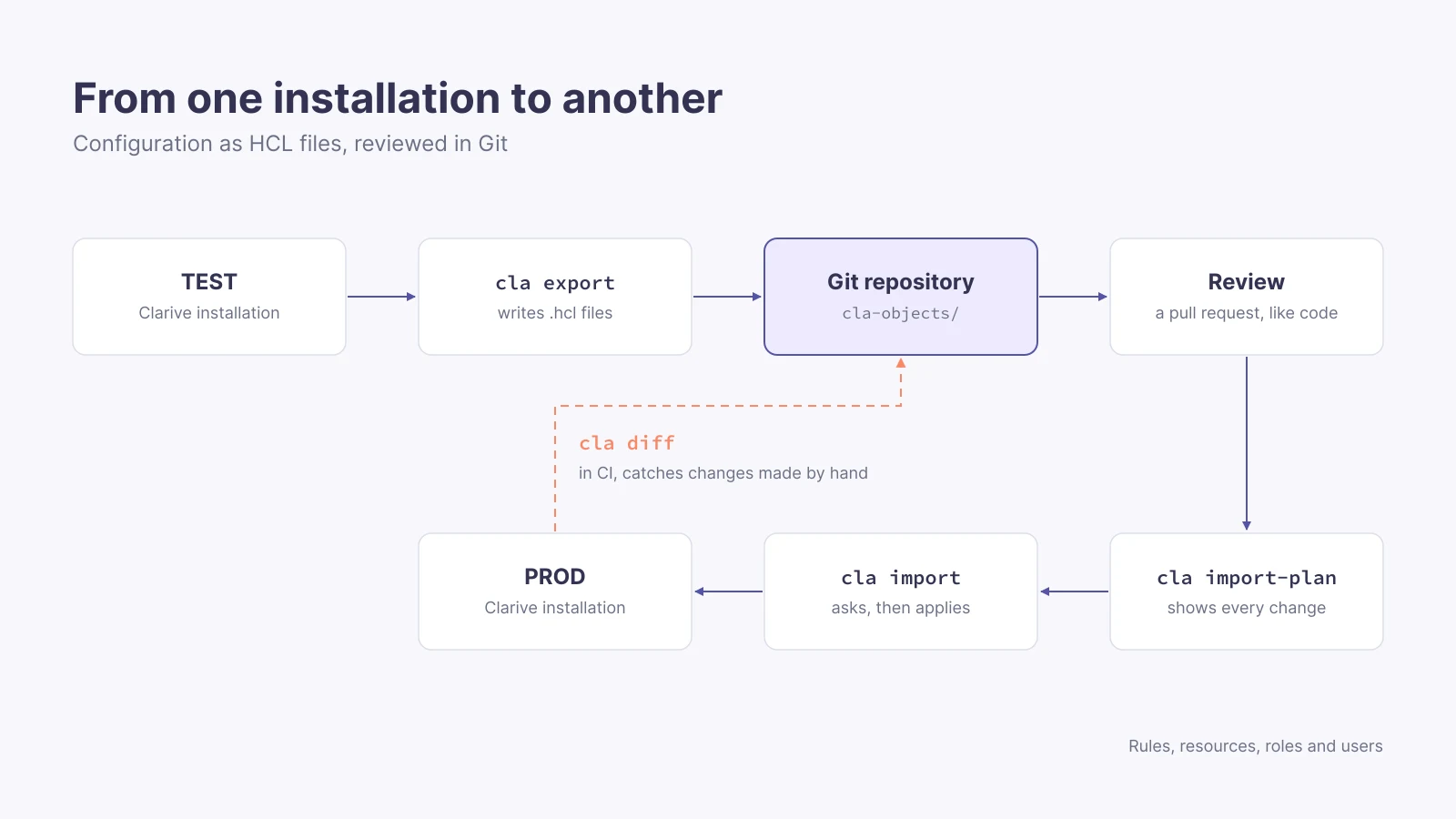
The first export gives a baseline, and it goes into Git. From then on a change made on TEST can be exported again and reviewed as a pull request, the same way a change to code is.
Before anything reaches production, cla import-plan compares the files with PROD and lists what an import would create, update, rename or delete. It writes nothing. cla import prints the same plan and waits for a yes. Nothing is deleted because a file forgot to mention it. An object that is missing from the files is left alone, unless the files remove it on purpose with a removed block or the import is run with --prune.
Afterward, a scheduled CI job can run cla diff against PROD. It exits with 1 when the installation and the files disagree. That's how someone finds out about a change made by hand in production.
The quick start in the documentation is six commands:
cla -c myconfig export --path ./cla-objects
cla fmt --recursive ./cla-objects
git add cla-objects && git commit -m 'baseline'
cla -c myconfig diff ./cla-objects
cla -c myconfig import-plan ./cla-objects --diff
cla -c myconfig import ./cla-objects
The first three take the baseline. The other three are for after a file has been edited. They show the difference and the plan, and then apply it.
Also in the interface
The command line works on whole configurations. The Clarive interface works on one object at a time, using the same engine. The Rule Designer has an HCL button that shows the rule being edited as text, which can be changed and saved there. Resources and roles have HCL tabs, and user groups have an HCL window. User records can be viewed as HCL but not edited there, because inviting a user, suspending one or changing a password has side effects. cla import is the supported way to move users.
Plain text also changes who can do the editing. An AI coding assistant can read an HCL file and propose a change to it. It can't do much with a database.
Over the next two weeks we'll publish a post every other day on each part of this. They cover the export and import commands, keeping installations in step with cla diff and rules written in HCL. Then come the HCL views in the interface, servers, variables and permissions and, last, what plain text means when an AI assistant does the editing.
The reference documentation starts at the HCL overview, and Clarive 7.22 is on the download page. If you want to see your own configuration as HCL, talk to us.